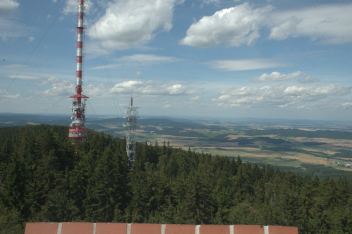
#1, Colour FITS
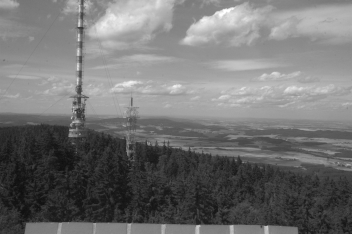
#2, X component
Rawtran is a wrapper around dcraw developed to produce images in the standard astronomical FITS format by processing of raw (CR2, CRW, MRW, etc.) photos.
Selected digital cameras offers possibility to save raw photos ‒ only slightly pre-processed photos intended for further image processing. Rawtran is developed as a wrapper around dcraw by D.Coffin to produce FITS files from the raw photos.
FITS files are basically used by astronomers. Rawtran creates fully compatible FITS files which can be processed by any standard astronomical software; the files are formally equivalent to ones, which has been acquired by an ordinary scientific instrument. FITS files created by Rawtran are suitable for all regular photometry, spectroscopy or astrometry processing.
Data philosophy of Rawtran holds the key aspects:
Image data are processed by such way, to save any carried photometry information. The spectral bands — colours — and the proper handling is important for a scientific interpretations. Rawtran implements the conversion from CIE 1931 XYZ colours, provided by dcraw itself, to BVR bands of Johnson photometry system.
Metadata or an exact description of actual exposure parameters, including exposure data, used equipment etc., are considered as the integral part of the image data, and becomes to be the integral part of scientific data processig. Rawtran extracts detailed EXIF information, enclosed into every raw photo, and interprets them in scope of common astronomical conventions.
Common use of a digital camera gives colour pictures. Unfortunately, there is no widely accepted convention, or definition, of the (natural) colour representation in the FITS world; Rawtran takes Munipack's specification:
Colour FITS files can be correctly displayed only by Munipack or Fitspng.
Options: -c X,Y,Z,B,V,R,Ri,Gi,Gi1,Gi2,Bi,clear,scotopic
The kind of conversion is intended for representation of detected counts in the colour band. The output is a grey-scale image, one is stored as two dimensional FITS primary array.
Instrumental bands by -c [Ri,Gi1,Gi2,Gi,Bi] are array elements under Bayer's mask. Gi is derived as the arithmetical mean Gi = (Gi1 + Gi2) / 2. These instrumental values are direct copy of on-chip counts specific for an unique camera model.
CIE 1931 XYZ bands by -c [X,Y,Z] are elements of the colour array derived by dcraw from the instrumental bands. Y component represents luminance: its spectral profile is similar to the spectral sensitivity of the human eye under well-light conditions (photopic vision).
Johnson's bands by -c [B,V,R] are derived by Rawtran from CIE 1931 XYZ with help of a built-in colour transformation matrix to Johnson UBVRI wide-band astronomical photometry system.
The data should be considered as an inaccurate approximation of photon rates in Johnson's filters. The exact transformation requires more detailed knowledge of full spectral sensitivity of a device, weather conditions, etc: determination of own transformation is highly recommended.
Derived bands by -c [scotopic, clear] simulates a wide-spectral band (like an unfiltered CCD image) or scotopic vision (like the human eye under low-light conditions). The visual difference between colour (or Y component) and the scotopic images illustrates Purkyňův effect.
Note, that the data are slightly modified as result of a colour interpolation on Bayer's mask. Use -X "-h" to switch-off the interpolation. All the data should be supposed as RELATIVE counts only.
Options: -c plain, -c all
This operation modes provides the low-level raw access to the original data via FITS format. It is designed to offer a direct conversion between the file formats: the conversion rearranges bytes only and does NOT modify data itself.
Plain array by -c plain is a single large array of pixels without any photometric transformations. It represents an unmodified on-chip image covered by Bayer's mask. A grid appears due different sensitivity of R, G and B pixels. The actual pattern depends on a particular camera model.
All array by -c all is a single 4D primary array without any photometric transformations. Original bands are stored in the four dimensional structure: width ⨉ height ⨉ 4. The bands stores Bayer's colours in that order: B (blue), G1 (green1), G2 (green2), R (red). According to astronomical terminology, the single bands are in an instrumental colour photometry system.
rawtran [options] file(s)
Normally, the output filename is determined by the way: Suffixes of input filenames, like *.CR2, are replaced by *.fits, and a full directory path is removed. It is designed to leave original data untouched, and to keep results in current, working, directory (see Examples).
In the FITS world, files can not be overwritten by default, except their filename is preceded with the exclamation point (!), like '!rawtran.fits'. Rawtran violates the rule by default; this options recovers the FITS world convention.
dcraw -D -4 -j -t 0 file.RAW
and pass it to dcraw -K file.pgm.
Note that sometimes can be necessary to switch-off automatic frame
rotation using -A "-t 0".
See Dark Frame section for more info.
dcraw -D -4 -j -t 0 dark.RAW.
See Dark Frame section for more info.
Splitting of the conversion parameters for dcraw onto -C, -X, -A groups is pure conventional; the core -C, -X and the tune -A options are separated to prevent potential mistakes. Setup of the core parameters is recommended only for users who know what they do.
0 indicates successful run. A non-zero value is returned when an error occurred during conversion: 1 means a general error, 2 indicates that conversion of any RAW file(s) has failed.
If the utility is launched without any options, or with -h switch: zero means that Rawtran internal checker can run dcraw binary, and non-zero value otherwise.
A raw photo converted to colour FITS (the result is displayed by xmunipack):
$ rawtran IMG_0666.CR2
$ xmunipack IMG_0666.fits
A plenty of RAW files, by file-mask *.CR2, in directory /path/with/archive, are converted as
$ cd workdir
$ rawtran /path/with/archive/*.CR2
All result, stored as *.fits, can be found in workdir.
Simulates the seen of the human eye at good light conditions:
$ rawtran -c Y -o IMG_0666_Y.fits IMG_0666.CR2
An image is an equivalent of Johnson's B filter:
$ rawtran -c B -o IMG_0666_B.fits IMG_0666.CR2
The above commands can be flexible extended with help of command line shell functionality.
An alternative of a plenty of files conversion:
  $ for A in *.CR2; do
     rawtran -o ${A%CR2}fits ${A};
    done
A frame separation on standard Johnson single bands:
  $ A=IMAGE_0666.CR2
  $ for F in B V R; do
     rawtran -c $F -o ${A%.CR2}_${F}.fits $A;
    done
An alternative to the common conversions, with results saved into a different directory, can be simulated by:
  $ DATADIR=/path/with/input/raws
  $ DESTDIR=/path/for/output/fitses
  $ for A in ${DATADIR}/*.CR2; do
      B=$(basename $A)
      C="${DESTDIR}/${B%.CR2}.fits"
      rawtran -o $C $A;
    done
FITS files occupies a lot of storage volume. FITS compression can help to save some volume, but it may complicate of its usability:
$ rawtran -o 'IMG_0666.fits[compress]' IMG_0666.CR2
#1, Colour FITS
#2, X component
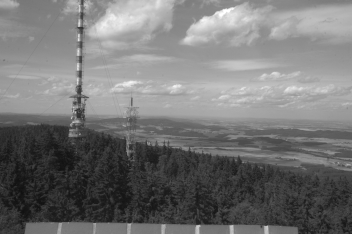
#3, Y component
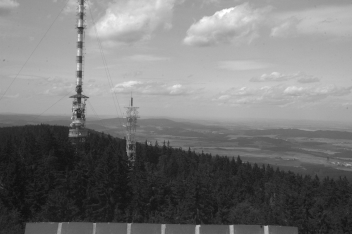
#4, Z component
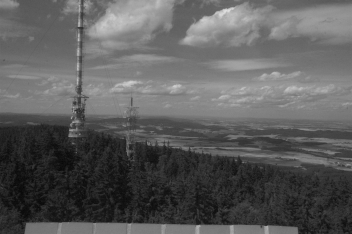
#5, R filter
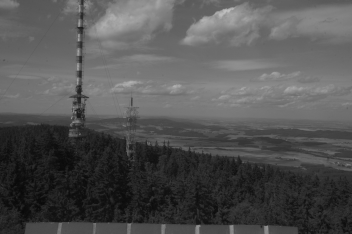
#6, V filter
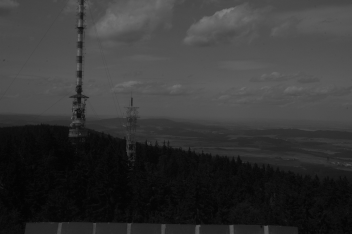
#7, B filter
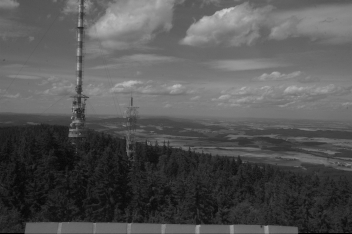
#8, Ri Bayer instrumental
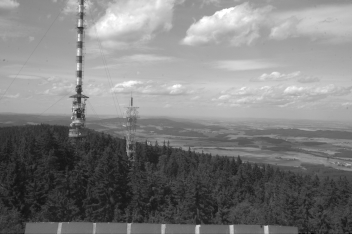
#9, Gi Bayer instrumental
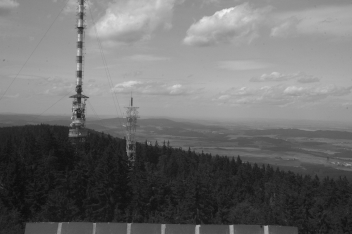
#10, Bi Bayer instrumental
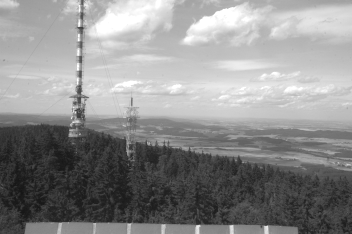
#11, Clear
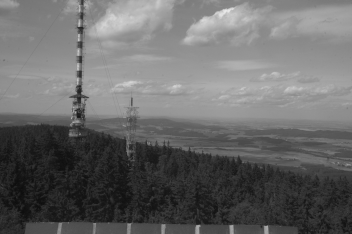
#12, Night vision (scotopic)
This gallery has been generated by the processing of the reference raw photo IMG_5952.CR2:
$ rawtran -o IMG_5952.fits               IMG_5952.CR2             #1
$ rawtran -o IMG_5952_X.fits -c X        IMG_5952.CR2             #2
$ rawtran -o IMG_5952_Y.fits -c Y        IMG_5952.CR2             #3
$ rawtran -o IMG_5952_Z.fits -c Z	 IMG_5952.CR2             #4
$ rawtran -o IMG_5952_R.fits -c R	 IMG_5952.CR2             #5
$ rawtran -o IMG_5952_V.fits -c V	 IMG_5952.CR2             #6
$ rawtran -o IMG_5952_B.fits -c B	 IMG_5952.CR2             #7
$ rawtran -o IMG_5952_Ri.fits -c Ri	 IMG_5952.CR2             #8
$ rawtran -o IMG_5952_Gi.fits -c Vi	 IMG_5952.CR2             #9
$ rawtran -o IMG_5952_Bi.fits -c Bi	 IMG_5952.CR2             #10
$ rawtran -o IMG_5952_c.fits -c clear	 IMG_5952.CR2             #11
$ rawtran -o IMG_5952_s.fits -c scotopic IMG_5952.CR2             #12

$ fitspng -fl 0,20000  -o IMG_5952.png    -s 10 IMG_5952.fits     #1
$ fitspng -fl 0,20000  -o IMG_5952_X.png  -s 10	IMG_5952_X.fits   #2
$ fitspng -fl 0,20000  -o IMG_5952_Y.png  -s 10	IMG_5952_Y.fits   #3
$ fitspng -fl 0,20000  -o IMG_5952_Z.png  -s 10	IMG_5952_Z.fits   #4
$ fitspng -fl 0,20000  -o IMG_5952_R.png  -s 10	IMG_5952_R.fits   #5
$ fitspng -fl 0,20000  -o IMG_5952_V.png  -s 10	IMG_5952_V.fits   #6
$ fitspng -fl 0,20000  -o IMG_5952_B.png  -s 10	IMG_5952_B.fits   #7
$ fitspng -fl 128,1000 -o IMG_5952_Ri.png -s 10	IMG_5952_Ri.fits  #8
$ fitspng -fl 128,1000 -o IMG_5952_Gi.png -s 10	IMG_5952_Gi.fits  #9
$ fitspng -fl 128,1000 -o IMG_5952_Bi.png -s 10	IMG_5952_Bi.fits  #10
$ fitspng -fl 0,40000  -o IMG_5952_c.png  -s 10	IMG_5952_u.fits   #11
$ fitspng -fl 0,20000  -o IMG_5952_s.png  -s 10	IMG_5952_s.fits   #12
The colour transformation between CIE 1931 XYZ and Johnson BVR, and vice versa, reduces accuracy of the colour reproduction.
The comparison of original and reproduced colours can be visualised by the way: the original RAW is decomposed onto B,V,R channels, and again assembled to a colour frame.
There are summarised commands to do the comparison. Both original and the final frames has set the white balance by a spot on coordinates 2370,1670 for FITS (origin in left bottom corner) and 2370,678 for PPM (origin in left top corner).
  $ rawtran -c B -o IMG_5952_B.fits IMG_5952.CR2
  $ rawtran -c V -o IMG_5952_V.fits IMG_5952.CR2
  $ rawtran -c R -o IMG_5952_R.fits IMG_5952.CR2
  $ munipack colouring --disable-back --white-spot 2370,1670 \
             IMG_5952_B.fits IMG_5952_V.fits IMG_5952_R.fits
  $ dcraw -A 2370 678 10 10  IMG_5952.CR2
On the first sight the processed image has blended colours ‒ the ideal transformation should give images which can not be recognised each other.
The colour transformations are computed by a matrix multiplication which approximates a single filter by another set of filters. The composition of forward and backward transformation matrix should be numerically close to unit matrix, which is not satisfied accurately. The reason for above recommendation has roots here.
Processed by dcraw

Reconstructed colours
Rawtran provides convenience functions for handling of dark frames.
The basic way is use of -D option, which launch dcraw to create PGM file representing of the dark:
$ rawtran -D dark.CR2 -o light.fits light.CR2
Note, dcraw sometimes saves results to PPM file, a transparent conversion to PGM can be required. Therefore the time duration of the procedure will depend on the conversion, and generally one will be twice slower than passing a PGM file directly by -A "-K file.pgm". An user is responsible to provide a correct dark frame, a frame taken without light.
A little bit advanced way is to use a FITS file as dark frame which is converted to PGM on the fly. Purpose of the option is to offer a possibility for averaging of dark frames. See, this hypothetical session:
$ rawtran -c plain -A "-j -t 0" -o dark1.fits dark1.CR2
$ rawtran -c plain -A "-j -t 0" -o dark2.fits dark2.CR2
$ munipack dark -o dark.fits dark?.fits   # or equivalent
$ rawtran -E dark.fits -o light.fits light.CR2
Initially, as shows first two lines (or possible more), we converts dark frames to FITS format by -c plain option, the created FITS-es are averaged (munipack utility is only an example), and finally, the averaged file is passed as the dark frame.
The tar-ball, or the development repository, is freely available under GPL3+ license. cfitsio library including files required for development (headers, static libraries) is necessary for building. Building itself does not depends on dcraw.
Rawtran runs under any Unix-like operating system (all flavors of GNU/Linux and BSD, Solaris, Mac OS X, etc). Usage under Windows or DOS has not been reported yet. Portability is limited by calling some particular functions (symlink, unlink) and mainly by pthreads. Rawtran packages can be found in GNU/Debian and Ubuntu.
A recommended way of local installation from the source code is:
$ tar zxf rawtran-X.Y.Z.tar.gz
$ cd rawtran-X.Y.Z/
$ autoreconf -i   # for Mercurial
$ ./configure CFLAGS="-O4 -DNDEBUG"
$ make
# make install
The last step should be executed under root account.
Both binary and
man page are installed under /usr/local tree. It would be
nice to keep the source directory for a case of later uninstall.
Building under RPM-bases distributions (RHELL, Fedora) requires place of Rawtran tarball to a directory where RPM places sources (rpmbuild), unpack the spec file and we can use the following commands to build:
$ rpmbuild -bb rawtran.spec
By design, Rawtran is a wrapper around dcraw. One internally launches dcraw as its sub-process and grabs an output data stream. Metadata (EXIF information) are obtained as:
dcraw -i -v -c
The image data oneself are imported by one of the alternatives:
 dcraw -4 -c -o 5    (standard bands)
 dcraw -4 -c -D      (instrumental bands)
These parameters can be carefully modified by -C option (except -c).
Data storage Rawtran converts PGM/PPM images in 16-bit colour depth to an equivalent FITS format with BITXPIX=16; no values modification is done for these instrumental bands (-c): Bayer's mask elements, plain and all. Another conversions: Colour FITS, or any conversion onto Johnson BVR filters, clear and scotopic filters, are internally computed in 4-byte floats (with precision of 7 decimals and the maximum value 1033); their values are rounded to nearest integers, and stored as unsigned 16-bit numbers (range from 0 to 65535) in FITS files.
Multi-threading Rawtran is designed as a multi-threaded application: it launches as much as possible dcraw instances (up to available CPUs limit) simultaneously. The approach increases performance, but a processing order of output files, or log records, can not be guarantied.
Fitspng is a converter from FITS to PNG. Munipack is a general utility to work with FITS images.
Development notes can be found in Hroch's diary.
Rawtran is free software licensed under the GNU General Public License. This gives you the freedom to use and modify Rawtran to suit your needs.
Copyright © 2007 — 2019, F. Hroch, Institute of Theoretical Physics and Astrophysics, Masaryk University, Brno, Czech Republic.